
When you're first getting into backend development, it’s incredibly easy to treat HTTP as a black box. You write a bit of Express or FastAPI code, hit an endpoint from your frontend, data moves across the wire, and you call it a day.
But the moment your production app drops connections, throws weird CORS errors, or grinds to a halt under a bit of traffic, treating HTTP like magic backfires. If you want to build systems that don't fall apart, you have to understand what the protocol is actually doing under the hood.
Let's break down the core mechanics of HTTP, skipping the dry textbook definitions and focusing on how it actually impacts your code.
1. The Core Rules: Statelessness and Client/Server
At its core, HTTP is built on two simple rules that dictate everything else:
- The Client-Server Model: The client (like a browser or an app) always starts the conversation. It sends a request, and the server responds. The server can't randomly ping a standard HTTP client out of nowhere to hand it data.
- Statelessness: HTTP has absolute amnesia. Every single request is a completely isolated event. The server processes it, sends back the data, and immediately forgets you ever existed.
Because the protocol itself doesn't remember anything, we have to build state management on top of it. When you log into a site or add an item to a shopping cart, your frontend has to explicitly attach a token or a cookie to every single request just so the server knows who is asking.
Underneath all this application-layer stuff sits TCP (Transmission Control Protocol). Before HTTP can even send a byte of data, TCP has to run a 3-way handshake to establish a reliable connection. It basically makes sure neither side drops data packets into the void.
2. How HTTP Got Faster (1.0 to 3.0)
As the web shifted from basic text pages to heavy, complex web apps, the way HTTP handles network connections had to adapt to keep things fast.
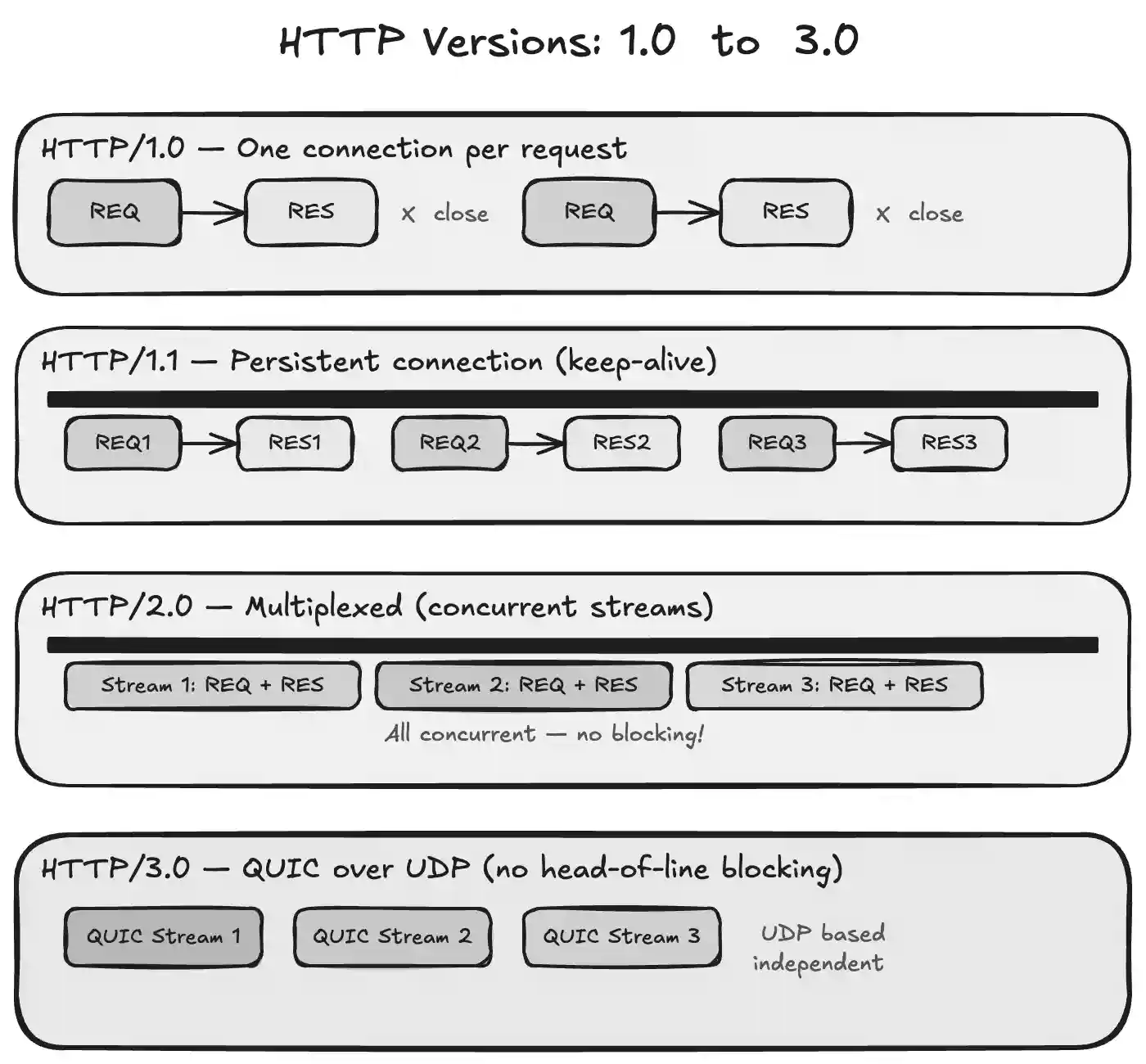
- HTTP/1.0 (The Old Way): Opened a brand-new TCP connection for every single request and closed it immediately after the response. If your page had 20 images, it opened and closed 20 separate connections. It was incredibly slow and heavy.
- HTTP/1.1 (The Standard): Introduced persistent connections (
keep-alive). Now, one TCP connection stays open so you can send multiple requests and responses down the same pipeline. This cut down a massive amount of latency. - HTTP/2.0 (The Multiplexed Way): Brought in multiplexing, meaning you can send a bunch of requests and responses concurrently over that one single connection, without them blocking each other. It also switched to binary framing instead of plain text, and added header compression.
- HTTP/3.0 (The Modern Edge): Ditches TCP entirely for a protocol called QUIC, which runs on top of UDP. Why? Because if a single packet gets lost in HTTP/2, the whole connection stalls (head-of-line blocking). HTTP/3 fixes this, making connection handshakes almost instant, even on unstable mobile networks.
3. Anatomy of a Request & Why Headers Matter
An HTTP message is literally just formatted plain text. It has a start line (specifying the method or status code), a list of key-value pairs called Headers, a mandatory blank line, and an optional Body (your JSON or HTML payload).
Think of headers like the shipping label on a cardboard box. The postal service doesn’t want to open your package to see where it goes or what’s inside; they just read the label on top. Headers let servers, browsers, and proxies handle routing, security, and content types without parsing the heavy body payload.
As a developer, you'll mostly look at four buckets of headers:
- Request Headers: Information about the client (e.g.,
User-Agentor theAuthorizationbearer token). - General Headers: Metadata independent of the payload, like the
DateorCache-Controlrules. - Representation Headers: Details describing the body itself, like
Content-Type: application/jsonorContent-Length. - Security Headers: Directives that tell the browser how to protect the user. For example,
Content-Security-Policystops malicious cross-site scripting (XSS), and settingHttpOnlyon session cookies ensures hacker scripts can't read them via JavaScript.
4. REST Semantics: Actions and Idempotency
HTTP methods aren't just arbitrary labels; they represent the intent of your action. A massive part of designing a clean API comes down to understanding idempotency—the idea that making a request multiple times should leave the server in the exact same state.
GET(Idempotent): You are strictly reading data. Running it 100 times shouldn't change anything in your database.POST(Non-Idempotent): You are creating something new. If you hit a POST endpoint twice, you create two distinct records. (Think of double-clicking a "submit payment" button—you don't want that to be idempotent).PATCH(Non-Idempotent): You're updating a partial piece of a record (like changing just a user's status profile).PUT(Idempotent): You're completely replacing a resource. If you upload a full user profile payload via PUT five times in a row, the final state of that profile is identical every single time.DELETE(Idempotent): You're wiping a resource out. The first delete removes it. The next 10 deletes do nothing because the resource is already gone.
5. Demystifying the CORS Nightmare
If you’ve spent more than a week in web development, you’ve probably run into a CORS error. Browsers enforce something called the Same-Origin Policy. If your frontend is running on localhost:5173 and tries to fetch data from localhost:3000, the browser steps in and says, "Whoa, hold on. Different origins. Is this safe?"
CORS handles this check in two distinct ways:
Simple Requests
If you’re doing a basic GET or POST with standard form data, the browser sends the request but slaps an Origin header on it. The server processes it and responds. If the server’s response doesn't include an Access-Control-Allow-Origin header that matches the client, the browser intercepts the response and blocks your frontend code from reading it.
Pre-flight Requests (The OPTIONS Method)
If you do something more complex—like sending a PUT or DELETE request, attaching custom headers, or sending a standard application/json payload—the browser doesn't want to risk sending the data blindly.
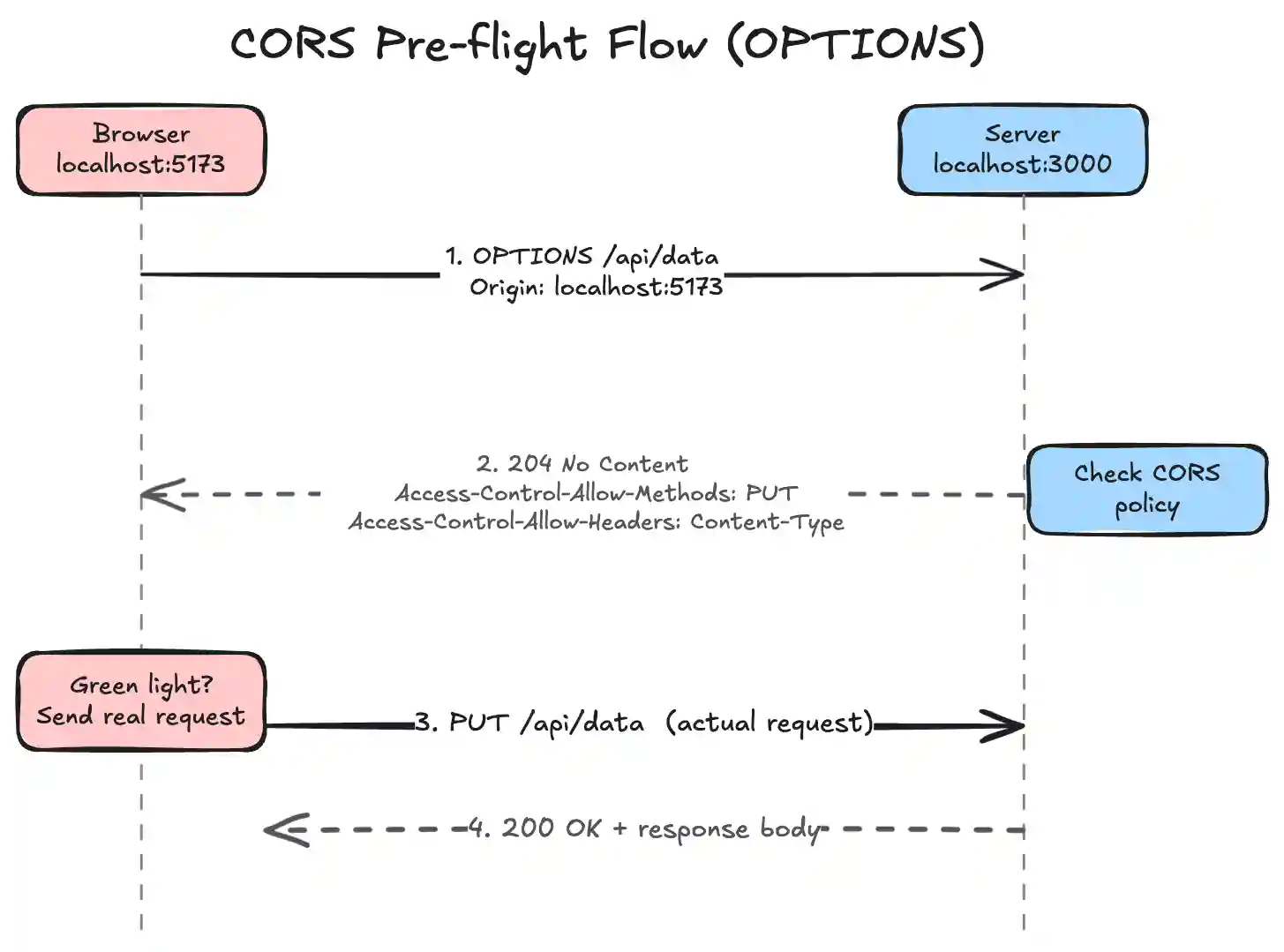
Instead, it automatically fires an OPTIONS request first. This is the "pre-flight" check. It’s essentially the browser asking the server: "Hey, I'm about to send a PUT request with a JSON payload from this origin. Do you allow that?"
The server has to reply with a 204 No Content status along with headers like Access-Control-Allow-Methods and Access-Control-Allow-Headers. If the server gives the green light, the browser immediately follows up by firing your actual, original request.
6. Decoding Status Codes
Status codes are the universal shorthand for how a request turned out. You don't want your frontend parsing text strings to see if a save worked; you want a standard number.
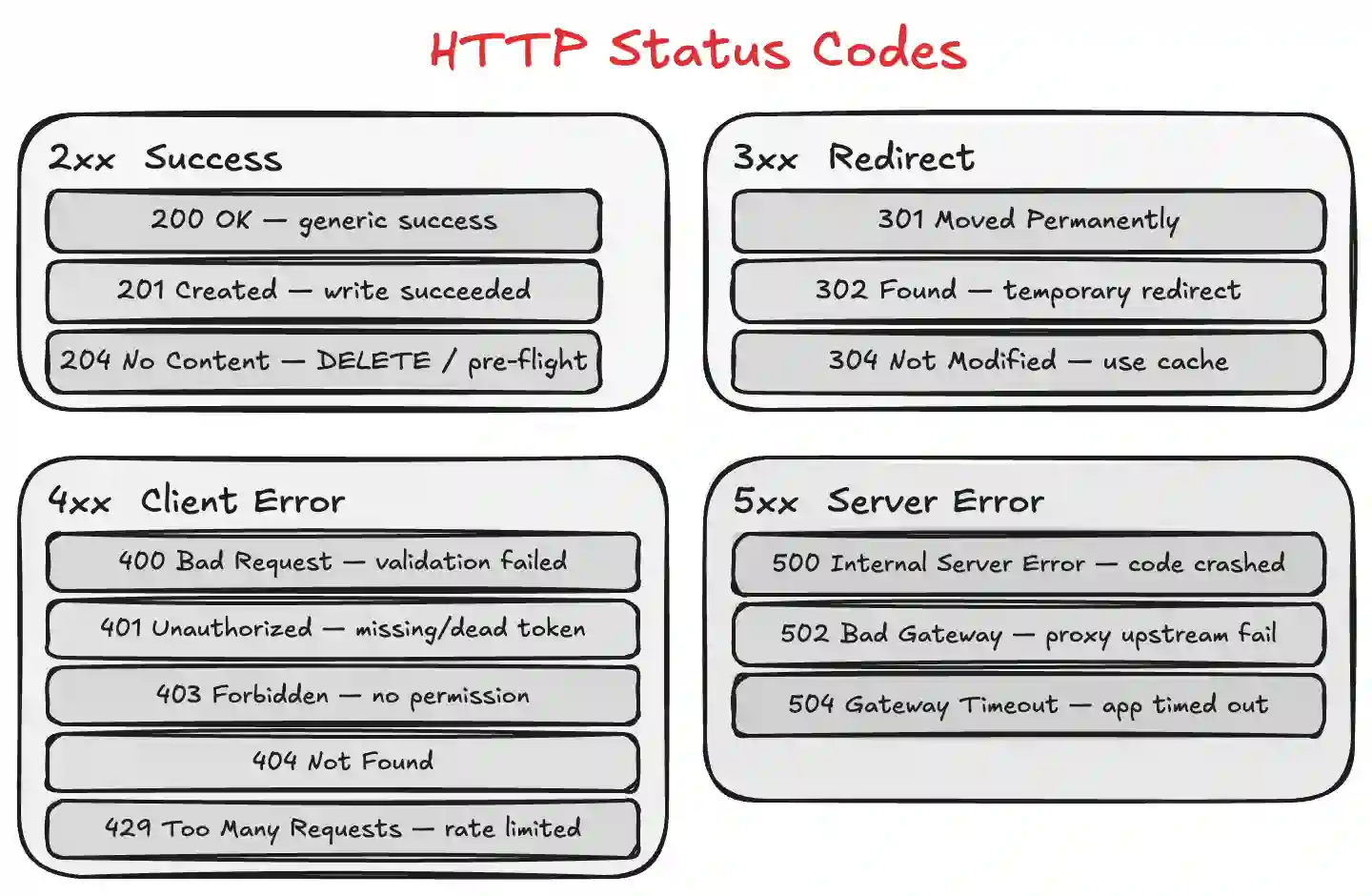
- 2xx (Success): Everything went fine.
200 OKis your generic success,201 Createdmeans a write operation succeeded, and204 No Contentmeans the action worked but there’s nothing to send back (perfect forDELETEor pre-flight endpoints). - 3xx (Redirection): The resource moved.
301means it’s permanently gone to a new URL,302is a temporary detour, and304 Not Modifiedtells the browser to pull from its own local cache instead of downloading duplicate data. - 4xx (Client Errors): You messed up.
400 Bad Requestmeans validation failed,401 Unauthorizedmeans your token is dead or missing,403 Forbiddenmeans we know who you are but you don't have permission for this resource,404 Not Foundis self-explanatory, and429 Too Many Requestsmeans you're hitting a rate limiter. - 5xx (Server Errors): The backend messed up.
500means the code crashed or threw an unhandled exception, and502/504usually mean a proxy like Nginx or an AWS load balancer timed out trying to talk to your underlying app instance.
7. Performance: Caching, Compression, and Streaming
When you scale an API to handle thousands of users, optimizations at the HTTP layer save serious compute power and bandwidth costs.
- Conditional Caching: Instead of making a client download a massive configuration profile every time they load the app, your server can send an
ETag(a unique hash of the data content). The next time the client requests that data, it sends the hash back. If the data hasn't changed on the backend, the server returns a quick304 Not Modifiedresponse without a body, saving processing time and bandwidth. - Gzip/Brotli Compression: If your client includes
Accept-Encoding: gzip, your server can compress heavy JSON text on the fly. This can literally shrink a massive 26MB raw dataset down to 3.8MB over the wire. The browser automatically unzips it on arrival. - Multipart and Streams: For uploading large files, standard JSON bodies break. Instead, you use
multipart/form-data, which slices files into smaller binary chunks separated by unique text boundaries. If you're sending massive files out from the server, you can usetext/event-streamto progressively pipe chunks down to the client over time instead of holding the entire file in server memory. - Always Use HTTPS: Standard HTTP sends text in the clear. Running traffic over HTTPS wraps the whole protocol inside a TLS (Transport Layer Security) tunnel, ensuring that credentials, tokens, and payloads are encrypted before they hit the wire.
Wrap Up
Once you can visualize how headers, methods, and status codes flow across the network, debugging changes entirely. Instead of blindly changing backend code when something fails, open your browser's network tab, look at the raw HTTP transaction, and check the pre-flight headers or status codes. The protocol almost always tells you exactly where the bridge is breaking.
Written by
Abhinav Yadav
